

Radiologist CV Studio
Bring your experience into focus. Create a polished CV for your next clinical role, academic appointment, or professional opportunity.
A clear path to your next CV.
Start with what you have. The studio helps you organize the rest.
-
Bring your experience
Import a CV, paste your LinkedIn text, or start from scratch with a few guided questions.
-
Make it yours
Review your profile, roles, training, and credentials. Add research, teaching, or an optional headshot.
-
Design and download
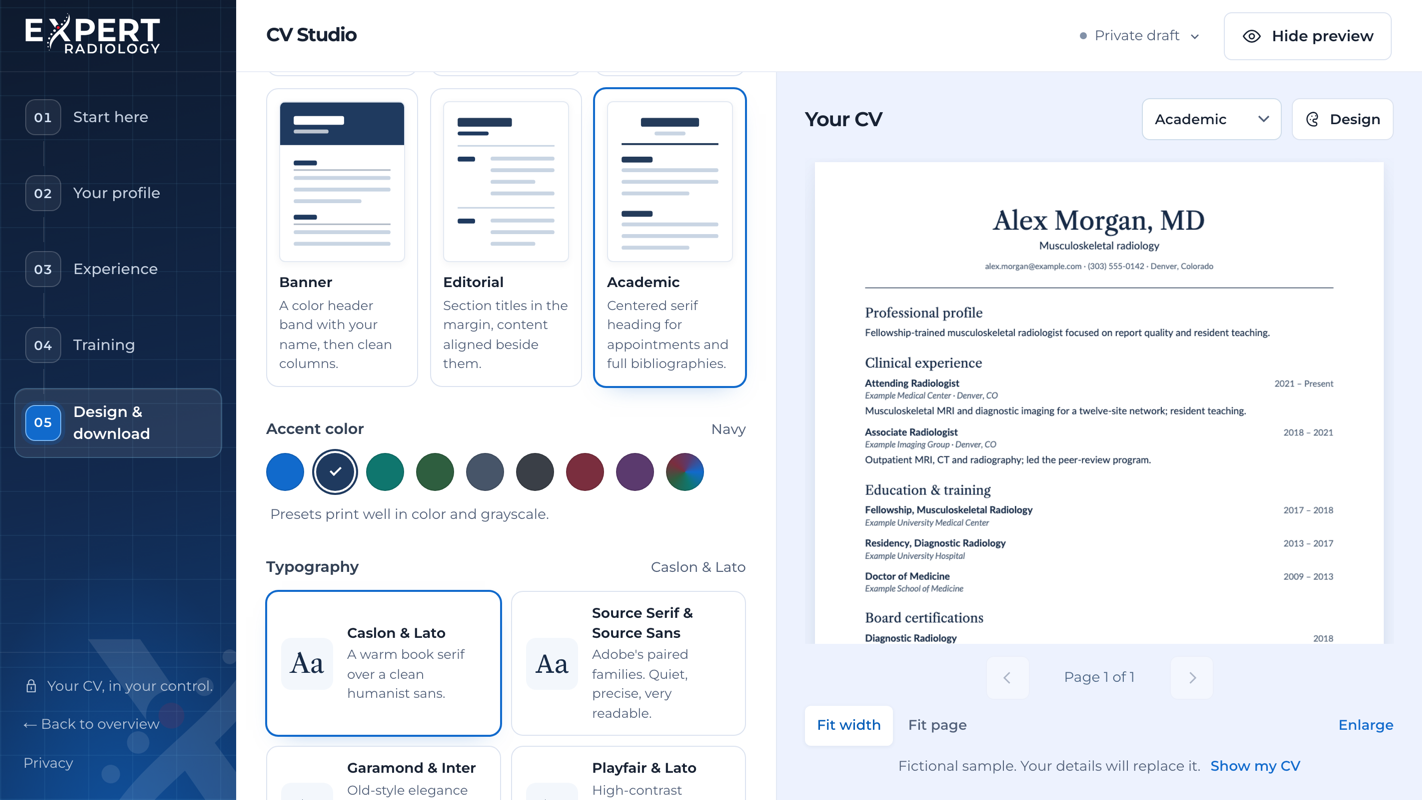
Pick a layout, an accent color, and a typeface while the preview updates, then download a PDF or editable Word document.
Choose a design for your next opportunity.
Six layouts, eight accent colors, and six typeface pairings, each with automatic page breaks and numbered continuation pages. Switch designs without re-entering your information.
- Classic and Academic
- Single-column layouts with dates aligned to the right, or a centered serif heading that gives appointments, teaching, and complete citations room to read.
- Sidebar
- A tinted column keeps contact details, board certifications, and licenses beside your experience, on the left or the right.
- Banner and Editorial
- A color header band with your name, or section titles set in the margin for a quieter, editorial page.

A few details about
CV Studio.
What to expect before you begin.
Yes. Import a PDF, Word (.docx), or text file, or paste your CV. For LinkedIn, upload the PDF saved from your profile or your LinkedIn data archive (Settings and Privacy, Data privacy, Download your data). Where automatic import is available, you can also paste your profile link to pull in what LinkedIn shares publicly. Prefer a fresh start? The studio guides you through a few simple questions. Review imported dates, credentials, and other details before downloading.
CV Studio is free. Download a PDF with selectable text or an editable Word document, with no watermark. Before downloading, you provide your name and contact email and agree to their storage in Expert Radiology’s CRM. Speaking with Physician Services is optional.
No. Every layout works with or without a photo, and academic CVs usually leave it out. If you add one, you can adjust the crop, choose a square or a 4:5 portrait frame, place it on a studio gray, deep navy, or soft light background, and download the finished photo for LinkedIn or a directory listing. The background swap runs in your browser, and the studio does not retouch your face.
Files and photos are read in your browser, and downloads are generated there. You can choose to save your draft on a private device; otherwise, keep the tab open. If you choose AI writing assistance, the selected field’s text is sent through our server to Anthropic for processing; provider retention policies apply. Browser dictation may send audio to your browser’s speech service. Expert Radiology does not receive or store that audio. At download, your submitted contact details and conversation choice go to our CRM. Read our privacy policy →